Epicentre installation and troubleshooting
Set up the player over ethernet or Wi-Fi, work through the troubleshooting checklist, and find the full specifications and network requirements.
Whether you have just unboxed a player or you are chasing down a problem with an existing one, start here. Everything for the Epicentre is on this page.
The Epicentre is Activaire's plug-and-play media player. Connect it over a wired ethernet cable or over Wi-Fi, connect the audio out to your amplifier, then power it on. Music starts within about two minutes.
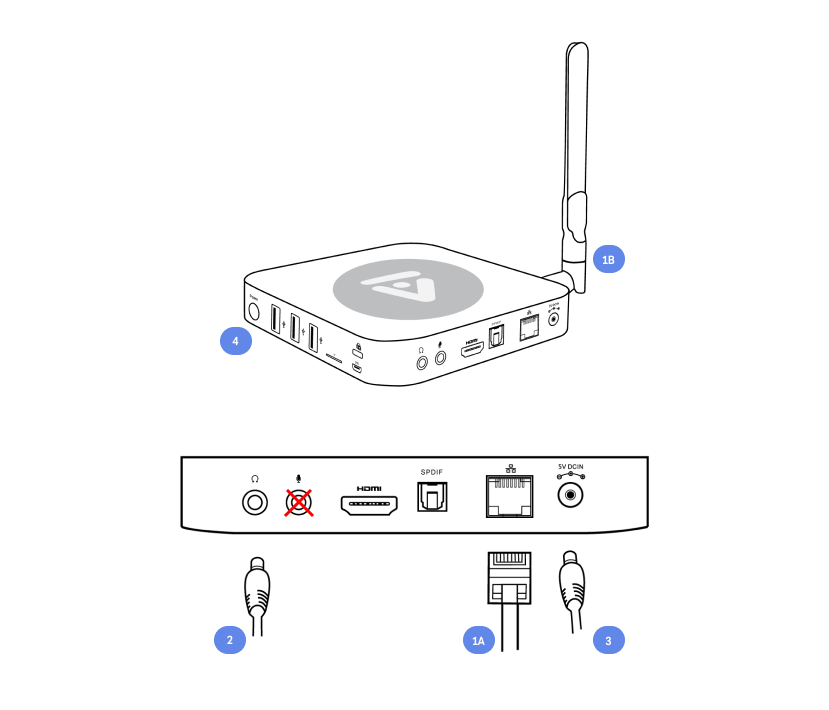
Install using an ethernet cable
- Connect the ethernet network cable to the media player.
- Connect the audio cable to your receiver or amplifier. Use either a 3.5mm audio plug into the headphone jack, or an optical cable into the SPDIF jack.
- Connect the power adapter to the back of the player and to a working power outlet.
- The front blue light turns on automatically. If it does not, press the power button on the right side of the player. Wait up to two minutes for music to start playing.
Install using Wi-Fi
- Attach the external wireless antenna included in the box.
- Connect the audio cable to your receiver or amplifier: a 3.5mm audio plug into the headphone jack, or an optical cable into the SPDIF jack.
- Connect the power adapter to the back of the player and to a working power outlet.
- The front blue light turns on automatically. If it does not, press the power button on the right side and wait up to two minutes for music.
Troubleshooting
Work through these in order. Most problems are resolved by the first or the last step.
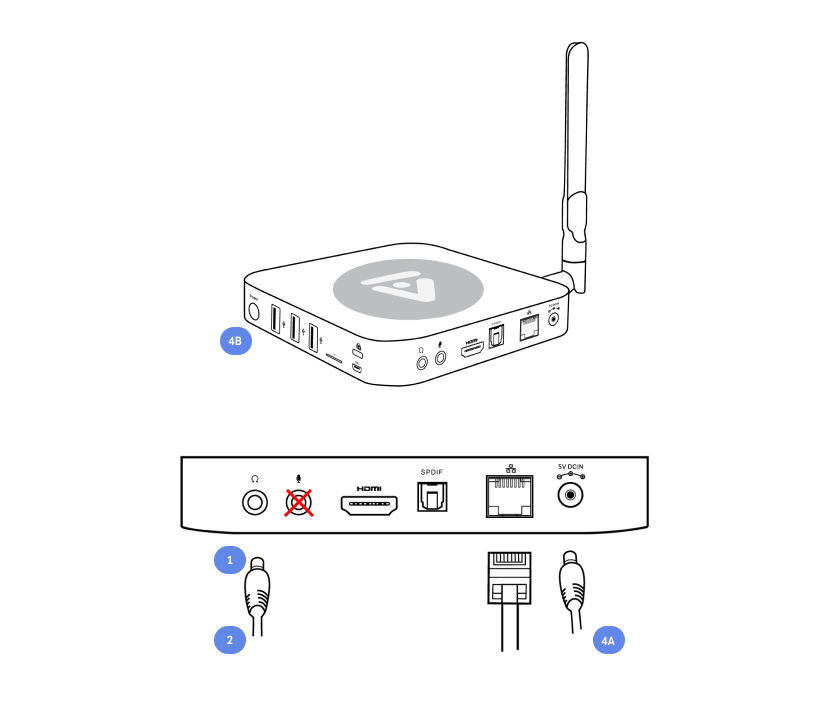
- Check that the audio cord is in the headphone jack and not the microphone jack.
- Confirm the player is producing sound at all by plugging headphones directly into it.
- If you hear music on headphones but not in the space, the player is working and the problem is downstream. Check with your A/V team for a disconnected wire or an issue with the amplifier.
- If the player is not outputting music at all, restart it by unplugging the power cord.
- Wait 30 seconds, then reconnect the power cord and press the power button. Allow two to four minutes for music to resume.
Specifications
| Component | Detail |
|---|---|
| Processor | Quad-Core Cortex A53 (64-bit) |
| GPU | Penta-Core Mali-450 |
| Memory | 2GB DDR3 |
| Internal storage | 16GB eMMC 5.0 (MLC) |
| Wireless | 802.11ac 2 x 2 MIMO Dual-Band Wi-Fi (2.4GHz / 5.0GHz), Bluetooth 4.1 |
| Audio output | HDMI 2.0, 3.5mm stereo jack, optical SPDIF |
| Peripherals | RJ-45 Gigabit Ethernet, Micro SD card reader, USB 2.0 x 3, OTG x 1, Kensington lock ready, microphone jack, headphone jack, IR receiver (remote included) |
| Power | DC 5V, 3A adapter included (CE, FCC certified) |
Network requirements
Each player needs internet access and should use a dedicated ethernet cable. Wi-Fi is permitted but not recommended.
- The player needs basic open network access.
- All communication to our servers is secure over HTTPS (port 443).
- A static IP can be assigned, but we recommend enabling DHCP on your router so the player auto-obtains a local IP address.
Advanced
For enterprise-level firewalls, have your network administrator review and allow the following:
| Port | Protocol | Purpose | Destination |
|---|---|---|---|
| 53 | UDP | DNS (routing) | Any public DNS |
| 123 | UDP | NTP (time sync) | pool.ntp.org* |
| 80 | TCP | Network health detection | verify.activaire.com* |
| 443 | TCP | Updates and device administration | connect.activaire.com (18.213.77.50), recovery.activaire.com (18.184.52.237), ds.activaire.com (18.211.34.40), ds3.activaire.com (52.1.176.93), auth.activaire.com*, artwork.activaire.com*, content.activaire.com* |
An asterisk marks dynamic URLs that resolve to a pool of IP addresses based on region and response times. If your enterprise requires mandatory static endpoint IPs for all communication, contact [email protected].
Additional network settings, if not already enabled:
- Enable NAT.
- Disable load-balancers (to support web-socket connections).
- Disable TCP RST.
- Enable support for TLSv1.2.